
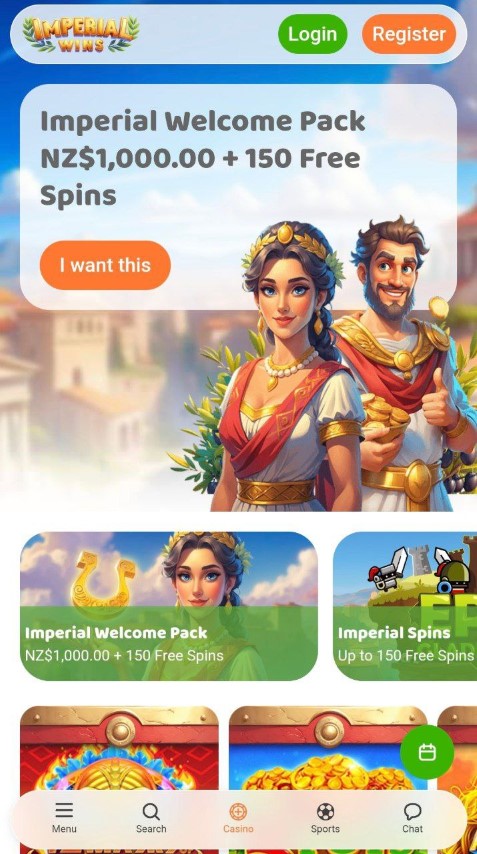
Imperial Wins Casino provides New Zealand players with a mobile gaming platform featuring pokies, live dealer tables, and classic casino games in 2026. The app supports iOS and Android devices, offering full account management, secure payments, and mobile-optimized deposit and withdrawal methods for play on the go.
Main Information
|
Feature |
Details |
|
Mobile Platform |
Native app + mobile browser |
|
Compatible Devices |
iOS 12.0+, Android 6.0+ |
|
Supported Currency |
NZD (New Zealand Dollar) |
|
Mobile Registration |
Yes, full account creation via app |
Imperial Wins Casino App Features










iOS App Requirements
Apple device users need iOS 12.0 or later to run the Imperial Wins Casino app. The app works on iPhone 7 and newer models, along with iPad devices from the fifth generation onward. Storage requirements sit at ~150-250MB depending on the version.
Download the iOS app directly from the App Store by searching "Imperial Wins Casino" or accessing the download link from the casino's mobile website. The installation process takes 2-3 minutes on standard Wi-Fi connections.
Android App Installation
Android users require version 6.0 (Marshmallow) or higher with at least ~200MB of free storage space. The app supports devices from major manufacturers including Samsung, Google Pixel, Huawei, and OnePlus.
Installation Steps:
-
Enable "Unknown Sources" in your Android security settings
-
Visit the Imperial Wins Casino website from your mobile browser
-
Locate the Android app download section
-
Download the APK file
-
Open the downloaded file and confirm installation
-
Launch the app and log in or create an account
Download directly from the official casino website rather than third-party APK repositories to ensure you receive the authentic, unmodified app file.
Mobile Browser Alternative
Players who prefer not to install an app can access Imperial Wins Casino through mobile browsers. The mobile website works on Safari (iOS), Chrome (Android/iOS), Firefox, and Samsung Internet Browser.
The browser version requires no installation, saves device storage, and updates automatically when you load the site. It lacks the push notification features available in native apps and may require you to bookmark the site for quick access.
Account Management on Mobile
Registration Process
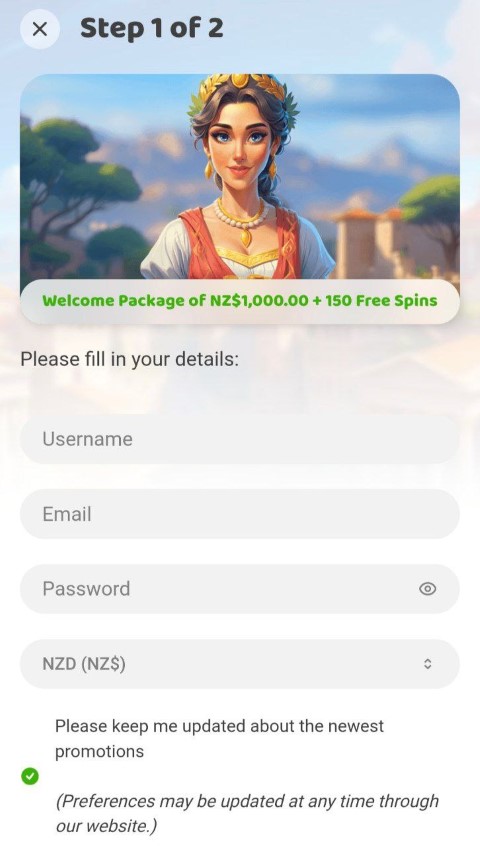
Create your Imperial Wins Casino account directly through the app without switching to desktop. The mobile registration form requests:
-
Email address and password creation
-
Personal details (full name, date of birth)
-
Address information for verification purposes
-
Mobile phone number for SMS authentication
-
Currency selection (choose NZD for New Zealand)
The process takes 3-5 minutes. You'll receive a confirmation email with an activation link; click this link from your mobile device to verify your email and gain full account access.
Identity Verification
Complete KYC (Know Your Customer) verification before your first withdrawal. The mobile app includes a document upload feature that uses your phone's camera.
Required Documents:
|
Document Type |
Accepted Formats |
Photo Tips |
|
Photo ID |
Passport, driver license |
All four corners visible |
|
Proof of Address |
Utility bill, bank statement |
Issued within 90 days |
|
Payment Method |
Card photo, e-wallet screenshot |
First 6 and last 4 digits visible |
Upload documents immediately after registration rather than waiting until you request a withdrawal. Verification completes within 24-48 hours.
Deposit Methods on Mobile
The Imperial Wins Casino app supports the same payment methods as the desktop version. Mobile deposits process through secure encrypted connections with the same speed as desktop transactions.
|
Method |
Processing |
Mobile-Specific Features |
|
Credit/Debit Cards |
Instant |
Saved card storage |
|
E-Wallets |
Instant |
Fingerprint authentication |
|
Bank Transfer |
1-3 business days |
Mobile banking app integration |
|
Prepaid Vouchers |
Instant |
Camera-based code scanning |
|
Cryptocurrency |
10-30 minutes |
QR code payment scanning |
E-wallets offer the most convenient mobile experience. Link your Skrill, Neteller, or MuchBetter account to the casino app for one-tap deposits using biometric authentication.
Check the cashier section within the app for current minimum deposit requirements. Most methods start at NZ$10-20, this number varies with method you choose.
Withdrawal Requests via App
Submit cashout requests directly through the mobile app's cashier interface. The withdrawal process mirrors the desktop experience:
-
Navigate to the cashier/withdrawal section
-
Select your preferred payment method
-
Enter the withdrawal amount
-
Confirm the transaction with your password or biometric
Withdrawal processing times depend on the payment method and your account verification status. E-wallets process within 24 hours, while bank transfers may take 3-5 business days.
First-time withdrawals trigger additional security checks. Expect delays of 24-72 hours while the casino verifies your identity documents and payment method ownership.
Security on Mobile Devices
App Security Features
The Imperial Wins Casino app uses encryption to protect your personal information, financial transactions, and gameplay data. Security measures include:
-
SSL/TLS encryption for all data transmission
-
Two-factor authentication options
-
Biometric login (fingerprint/Face ID)
-
Automatic logout after inactivity periods
-
Secure credential storage
Also you can enable biometric authentication in the app settings for faster, more secure logins. This prevents unauthorized access if someone else picks up your unlocked device.
Safe Mobile Gaming Practices
Protect your Imperial Wins account when gaming on mobile:
-
Use secure connections: Avoid public Wi-Fi for deposits and withdrawals. Hackers on public networks can intercept unencrypted data.
-
Enable screen lock: Set a PIN, pattern, or biometric lock on your device. This prevents others from accessing the casino app if you lose your phone.
-
Update regularly: Install app updates and operating system patches. Updates often include security fixes for newly discovered vulnerabilities.
-
Unique passwords: Create a strong, unique password for your casino account. Don't reuse passwords from other sites.
-
Logout after sessions: Manually log out rather than just closing the app. This fully terminates your session.
Lost or Stolen Device
If your phone is lost or stolen, immediately:
-
Contact Imperial Wins Casino support to freeze your account
-
Change your password from another device
-
Revoke app access through your account security settings
-
Monitor your bank statements for unauthorized transactions
Enable remote device wiping features on your phone before problems occur. Apple's Find My iPhone and Google's Find My Device let you erase all data remotely if your device is stolen.
Imperial Wins Casino App vs Mobile Browser
|
Feature |
Native App |
Mobile Browser |
|
Installation Required |
Yes (~150-250MB) |
No |
|
Push Notifications |
Yes |
Limited |
|
Offline Access |
No (requires connection) |
No |
|
Biometric Login |
Yes |
Depends on browser |
|
Performance |
Optimized |
Variable |
|
Updates |
Manual/automatic |
Automatic |
|
Storage Space |
Uses ~150-250MB |
Minimal |
Both options provide the same games, banking methods, and functionality. The choice depends on your gaming frequency and device preferences.
Responsible Gaming for New Zealand Players
Mobile casino apps make gaming more accessible, which increases the importance of responsible gambling practices. The convenience of playing anywhere can blur the boundaries between entertainment and excessive gambling.
Set limits before you start:
-
Deposit limits: Decide your maximum daily, weekly, or monthly deposit amount
-
Time limits: Use phone screen-time features to monitor casino app usage
-
Loss limits: Stop playing after reaching a predetermined loss threshold
-
Session reminders: Set alarms to remind yourself to take breaks
Imperial Wins Casino should provide responsible gambling tools in the app settings. Look for features like:
-
Self-imposed deposit limits
-
Session time reminders
-
Self-exclusion options (temporary or permanent)
-
Reality checks showing time and money spent
-
Direct links to gambling support organizations
New Zealand Gambling Support Resources:
-
Gambling Helpline NZ: 0800 654 655 (free, confidential, 24/7)
-
Lifeline: 0800 543 354
-
Visit gamblinghelpline.co.nz for online chat support
Frequently Asked Questions
Is the Imperial Wins Casino app free to download?
The app is free to download and install on both iOS and Android devices. You'll need to fund your account to play real-money games, but the software itself has no cost. Game play requires an internet connection and will consume mobile data if not on Wi-Fi.
Can I use the same account on mobile and desktop?
Your Imperial Wins Casino account works across all platforms. Log in with the same credentials on the mobile app, mobile browser, and desktop website. Start a gaming session on your phone and continue later on your computer without any additional setup.
How do I deposit money using the mobile app?
Navigate to the cashier section within the app, select "Deposit," choose your payment method, enter the amount, and confirm the transaction. Deposits process immediately for most methods. Save payment details securely in the app for faster future deposits.
What should I do if the app crashes during a game?
Close the app completely and reopen it. Log back in and navigate to the game you were playing. The game state saves automatically, so your current round and balance will be preserved. Contact support with the specific game name, time, and bet amount if you believe an error occurred.
Do mobile bonuses have different wagering requirements?
Mobile bonuses have the same terms as desktop offers unless specifically marked as mobile-exclusive. Check the bonus terms in the promotions section for the exact wagering multiplier, game contributions, and time limits. Terms apply equally whether you claim through the app or website.
Can I withdraw winnings directly from the mobile app?
Submit withdrawal requests through the cashier section in the app. Processing times and methods match the desktop experience. Complete identity verification before your first withdrawal to avoid delays. The casino may request additional verification for large withdrawal amounts regardless of platform used. Check your account email for verification requests and upload documents promptly.

