
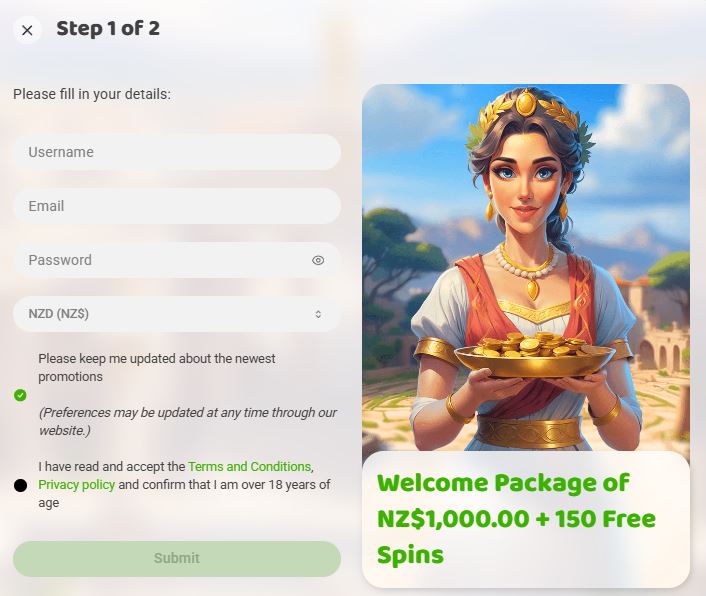
Creating an account at Imperial Wins Casino takes minutes when you know the process. New Zealand players can choose from multiple registration methods, each designed for quick access to the game lobby. This page walks through every step, document requirement, and common issue you might encounter during sign-up.
Complete your registration correctly the first time to avoid delays when requesting your first withdrawal. Verification happens early at most online casinos, and Imperial Wins follows standard protocols for account security.
Imperial Wins Registration Details
|
Registration Feature |
Details |
|
Minimum Age |
18+ years (strictly enforced) |
|
Registration Methods |
Email, one-click, social media |
|
Required Information |
Name, email, password, address, DOB |
|
Currency Options |
NZD, USD, EUR, and others |
|
Time to Complete |
2-5 minutes |
|
Verification Required |
Yes (before first withdrawal) |
|
Multiple Accounts |
Not permitted (one per person) |
New Zealand players face no specific restrictions when registering at Imperial Wins. The platform accepts Kiwi players and processes transactions in New Zealand dollars, eliminating currency conversion fees.
How to Register at Imperial Wins Casino










Registration takes about 2-3 minutes. Verification can be completed later before your first withdrawal.
Standard Email Registration
-
Open the Imperial Wins Casino website and click Register
-
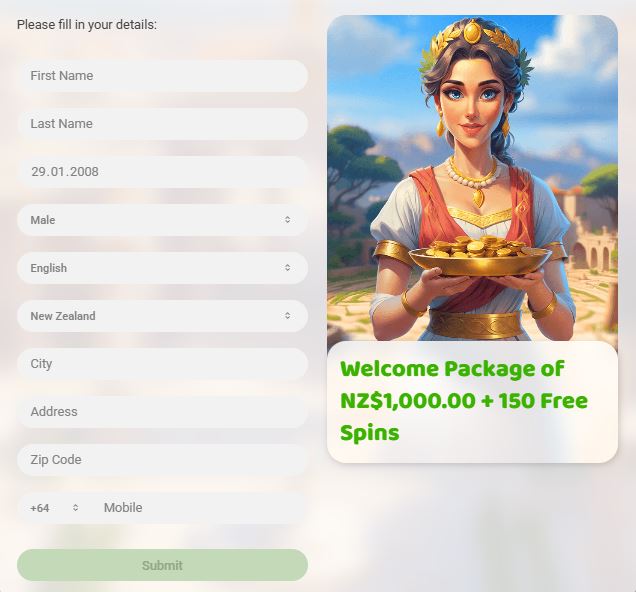
Enter your real name, date of birth, and create a password
-
Add your email address and mobile number (+64 for New Zealand)
-
Enter your full residential address (must match your ID)
-
Select NZD as your account currency
-
Accept the terms and age confirmation
-
Submit the form and confirm your account via the email link
Document Requirements for Verification
Imperial Wins requests identity verification before processing your first withdrawal. Prepare these documents in advance to speed up the approval process.
Accepted Identity Documents
|
Document Type |
Requirements |
Pro Tips |
|
Passport |
Photo page showing full name, DOB, photo |
Most universally accepted ID |
|
Driver's License |
Front and back, showing address |
NZ license works for both ID and address |
|
National ID Card |
Both sides, clear photo |
Must show expiry date |
Take a clear photo or scan showing all four corners of the document. Avoid glare from lights, and ensure text is readable. Upload files in JPG, PNG, or PDF format, under 5MB per file.
Common Registration Issues and Solutions
|
Issue |
What It Means |
How to Fix It |
|
Email already registered |
An account already exists with your email |
Use Forgot Password, check spam for old emails, or contact support if the account wasn’t created by you |
|
Age verification failed |
Birthdate entered incorrectly or shows under 18 |
Check date format (DD/MM/YYYY), correct typos, contact support with valid ID if needed |
|
Country / geo-block error |
System detects restricted location |
Disable VPN/proxy, clear cache & cookies, retry from NZ connection, contact support if traveling |
|
Duplicate account detected |
Multiple accounts linked to one person |
Contact support immediately, close old account, never deposit before resolving |
|
Required fields error |
Missing mandatory information |
Complete all fields marked with *, review form carefully |
|
Name format rejected |
Special characters not accepted |
Remove hyphens/apostrophes/accents or ask support for manual registration |
|
Invalid NZ postal code |
Incorrect postcode format |
Use correct 4-digit NZ code, contact support if system rejects valid code |
This table covers all common signup blockers and how to resolve them fast without risking account closure or delays.
Account Verification Timeline
Submit documents immediately after registration to avoid delays later. Imperial Wins verification within 24-48 hours during business days. Weekend submissions process on Monday.
Verification Process Timeline:
-
Upload Documents (Day 1): Submit all three document types through the account verification section or email them to support
-
Initial Review (Day 1-2): Compliance team checks document quality and validity
-
Request Additional Info (if needed): Support contacts you if photos are unclear or documents are expired
-
Approval (Day 2-3): Account status changes to "verified" and withdrawal access unlocks
Check the verification status in your account settings. "Pending" means documents are under review. "Verified" means you're approved for withdrawals. "Documents Required" or "Action Needed" means something needs correction.
Login Solutions for Common Errors
|
Issue |
What’s Happening |
How to Fix It |
|
Wrong password |
Incorrect credentials entered |
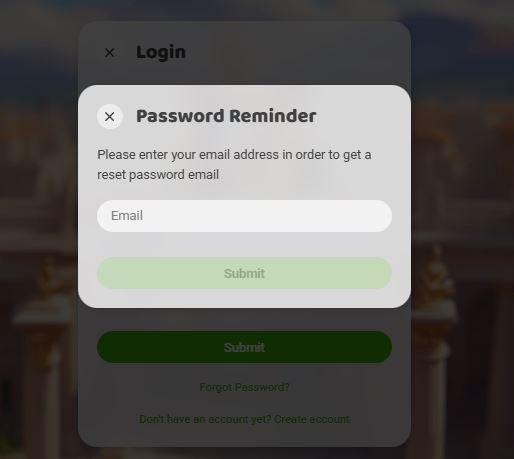
Use Forgot Password, reset via email (check spam). Wait out lockout instead of guessing |
|
Account temporarily locked |
Too many failed attempts |
Wait 30-60 minutes, then log in with correct password or reset it |
|
Account suspended |
Verification or policy issue |
Contact support with registered email and ask for the suspension reason |
|
2FA access lost |
Authenticator app unavailable |
Contact support to disable 2FA temporarily; use backup codes if saved |
|
Session expired / login loop |
Corrupted cache or cookies |
Clear cache & cookies, try incognito/private mode |
|
Browser compatibility issues |
Outdated browser |
Update Chrome/Firefox/Safari, disable conflicting extensions |
|
App login errors |
Corrupted app data or wrong source |
Reinstall app from official store only |
|
App not available in region |
App not listed locally |
Use the mobile browser version instead |
VPN and Access Policy
Check Imperial Wins' terms and conditions regarding VPN usage. Some casinos prohibit VPNs entirely, while others allow them for privacy but require you to verify your real location during registration.
Safe VPN Use Cases:
-
Protecting your privacy on public WiFi while accessing your existing account
-
Preventing your ISP from seeing your gambling activity
-
Accessing your account while traveling (if the casino permits international access)
If you need a VPN for legitimate privacy reasons, contact support before using it. Ask explicitly if VPN usage is permitted and document their response.
Responsible Gambling Tools
Set deposit limits during or immediately after registration. Most players find it easier to set boundaries before they start playing rather than trying to implement limits mid-session.
Available Limit Types:
|
Limit Type |
Function |
Best For |
|
Daily Deposit Limit |
Caps total deposits per 24 hours |
Players who deposit frequently |
|
Weekly Deposit Limit |
Caps total deposits per 7 days |
Monthly budget planning |
|
Monthly Deposit Limit |
Caps total deposits per 30 days |
Long-term bankroll management |
|
Session Time Limit |
Alerts you after set playing time |
Preventing marathon sessions |
|
Loss Limit |
Stops play after losing set amount |
Protecting your bankroll |
Access these settings in your account profile under "Responsible Gambling" or "Account Limits." Changes to limits take 24-48 hours to apply when increasing them (instant when decreasing).
Self-exclusion options let you close your account temporarily or permanently. Use this feature if gambling is causing problems in your life. Temporary exclusions range from 24 hours to 6 months. Permanent self-exclusion closes your account indefinitely.
Support Contact Methods
Reach Imperial Wins support through these channels when facing registration issues:
-
Live Chat: Click the chat icon on the website (bottom-right corner). Live chat operates during specified hours: check the site for exact times. Expect response times of 1-5 minutes during business hours.
-
Email Support: Send detailed messages including your account username (not password), registered email, and description of the issue. Attach relevant screenshots if you're encountering error messages. Response times range from 2-24 hours.
-
FAQ Section: Check the Help Center or FAQ page before contacting support. Most registration questions have detailed answers already written, giving you instant solutions.
When contacting support about registration problems, include:
-
The exact error message you're seeing
-
Which registration method you tried (email, one-click, social)
-
Screenshots of the problem (remove sensitive information)
-
Your registered email address
-
Steps you've already tried
Frequently Asked Questions
Can I register multiple accounts at Imperial Wins Casino?
No. One account per person is standard across all online casinos. Creating duplicate accounts violates terms and conditions, resulting in closure of all accounts and potential forfeiture of funds. If you forgot about an old account and created a new one, contact support immediately to explain the situation before depositing money.
How long does account verification take?
Document verification takes 24-48 hours during business days. Upload clear, high-quality photos of your ID, proof of address, and payment method to avoid delays. Weekend submissions process on Monday. If you haven't heard back within 3 business days, contact support to check your verification status.
What happens if I enter wrong information during registration?
Contact support immediately if you notice errors after submitting your registration. Small typos in addresses or phone numbers can be corrected by support staff. Major changes to your name or birthdate require proof through ID documents. Never create a new account to correct mistakes: this creates a duplicate account problem.
Do I need to verify my account before depositing?
You can deposit before completing verification, but you cannot withdraw until your account is verified. Submit documents immediately after registration to avoid frustration when you want to cash out winnings. Some casinos let you play with deposits up to a certain amount before requiring verification.
Can I change my currency after registration?
Currency selection is permanent. Imperial Wins do not allow currency changes after account creation because it complicates financial tracking and auditing. Contact support if you need to change currency: they may close your existing account and let you create a new one with the correct currency, but only if you haven't deposited yet.
What should I do if I can't access my email after registration?
Contact support immediately using a different email address. Provide your username, full name, date of birth, and any other identifying information. They'll verify your identity through security questions or ID documents, then update your email address on file. Never create a new account just because you lost email access.
Is it safe to upload my ID documents to the casino?
Licensed casinos use encrypted systems to protect your documents and comply with data protection regulations. Only upload documents through the official website's secure verification portal: never email unencrypted ID scans. Legitimate casinos need verification to prevent fraud and money laundering. If you're uncomfortable, check the casino's license status and privacy policy before proceeding.

